 Study.AI
01
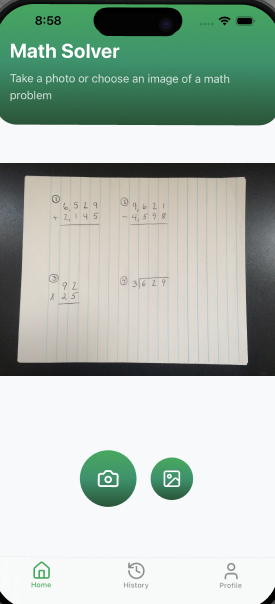
Point the camera
Photograph the page or pick an image from your gallery. Handwriting works too.
Homework solver for iPhone
Study.AI reads handwritten and printed math straight from your camera and walks through the solution line by line — so you follow the method, not just copy a number.
iPhone · iOS [15.0]+ · Free to try
How it works
No typing equations, no hunting for the right symbol on a keyboard.
01
Photograph the page or pick an image from your gallery. Handwriting works too.
02
Every problem comes back broken into numbered steps with the reasoning shown.
03
Still lost on a step? Ask in chat and get it explained a different way.
What’s inside
Reads pencil on lined paper, not just clean printed textbooks.
Scan the page and get every problem solved separately.
Carries, borrows and intermediate lines written out like a teacher would.
Every solve saved with a date, so revising means scrolling back.
Ask why a step works and get it explained another way.
Arithmetic and fractions through equations, word problems and geometry.
Inside the app
ScanCamera or gallery, one tap either way.
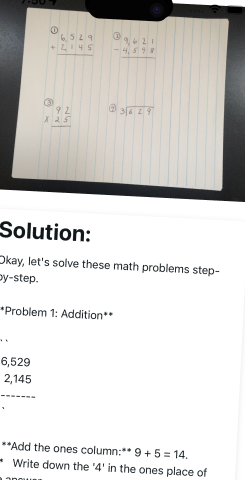
SolveThe full working, step by step.
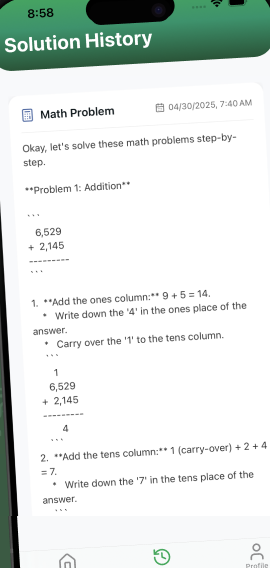
ReviseEverything you solved, saved by date.
Study.AI runs on a language model, and language models get things wrong — especially with messy handwriting or unusual notation. Treat a solution as a worked example to check against, not a final answer to hand in. If a step looks off, it might be.
Questions
You can try Study.AI for free. Unlimited solving is part of a paid subscription — the price is shown in the app before you commit, and you can cancel any time. Details on the support page.
Algebra and geometry — including arithmetic, fractions, equations and word problems. Handwritten and printed input both work.
Yes — it is built around photographing real notebook pages. Clear writing and good light give the best results; a blurry photo produces a shakier answer.
No. An image is processed to generate the solution and deleted straight afterwards — we keep no copy. Your solution history is saved locally on your device, and deleting the app removes it. Details in the Privacy Notice.
No. Solving happens on a server, so a connection is required. Saved history stays available on the device.
Subscriptions are managed by Apple, not inside the app. Step-by-step instructions are on the support page.